Tuesday, June 26, 2012

Monday, June 18, 2012
NUNIT - Erreur 23 The command exited with code 9009
If you get this error Erreur :
The command ""C:\Program Files (x86)\NUnit 2.6\bin\nunit-x86.exe""xxx.dll"" exited with code 9009.
To resolve this, you should get back on the properties of your dotnet project (Visual Studio 2008) to manage the post build event
Put some space between the PATH and the Target Filename
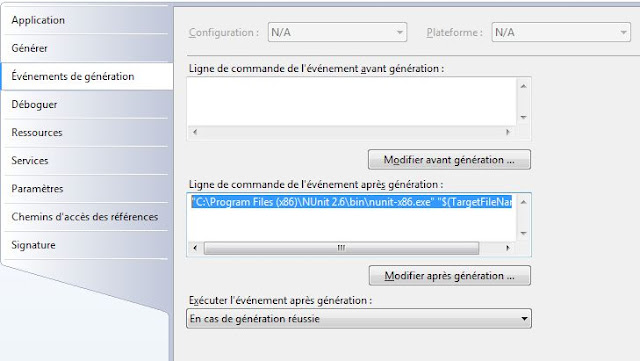 "C:\Program Files (x86)\NUnit 2.6\bin\nunit-x86.exe" "$(TargetFileName)"
The command ""C:\Program Files (x86)\NUnit 2.6\bin\nunit-x86.exe""xxx.dll"" exited with code 9009.
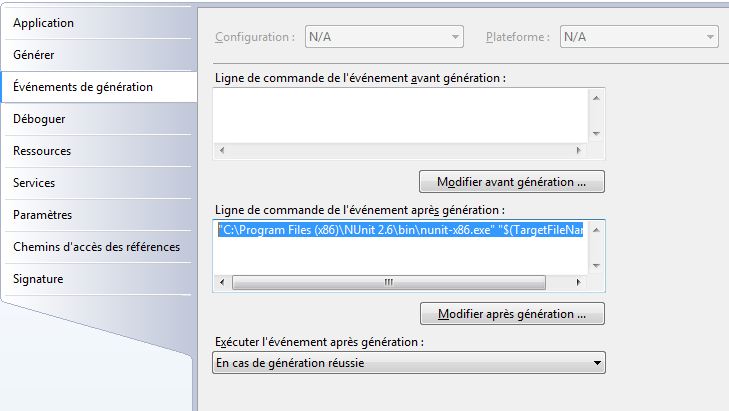
To resolve this, you should get back on the properties of your dotnet project (Visual Studio 2008) to manage the post build event
Put some space between the PATH and the Target Filename
Thursday, May 31, 2012

Friday, May 25, 2012
Thursday, May 24, 2012
Windows Virtual PC
Follow these steps if want to run XP OS through Windows seven thanks to Windows Virtual PC
Download and install Windows XP Mode at http://www.microsoft.com/windows/virtual-pc/download.aspx.
Step 1: Download Windows XP Mode
Step 2: Download Windows Virtual PC
Step 3: Update Windows XP Mode
Monday, May 21, 2012
Physical Memory Limits: Windows Server 2008
The following table specifies the limits on physical memory for Windows Server 2008. Limits greater than 4 GB
for 32-bit Windows assume that PAE is enabled.
| Version | Limit on X86 | Limit on X64 | Limit on IA64 | |
|---|---|---|---|---|
| Windows Server 2008 Datacenter | 64 GB | 1 TB | ||
| Windows Server 2008 Enterprise | 64 GB | 1 TB | ||
| Windows Server 2008 HPC Edition | 128 GB | |||
| Windows Server 2008 Standard | 4 GB | 32 GB | ||
| Windows Server 2008 for Itanium-Based Systems | 2 TB | |||
| Windows Small Business Server 2008 | 4 GB | 32 GB | ||
| Windows Web Server 2008 | 4 GB | 32 GB |
http://msdn.microsoft.com/en-us/library/windows/desktop/aa366778%28v=vs.85%29.aspx#physical_memory_limits_windows_server_2008
Wednesday, May 16, 2012
Configuration des restrictions ISAPI dans IIS 7
Si vous êtes confrontés à cette erreur lors du déploiement de votre application sur un serveur IIS 7.0
Erreur HTTP 404.2 - Not Found
La page que vous avez demandée est introuvable en raison des paramètres de la liste des restrictions ISAPI et CGI du serveur Web.
Cette erreur peut venir du fait qu'il existe une restriction d’exécution sur votre pool d'application.
Sur votre gestionnaire de service internet (IIS), cliquez sur les Restrictions ISAPI et CGI puis autorisez le module ISAPI/CGI pour votre pool d'application. Votre application devrait alors s'executer.
NB : Vérifier que les module CGI et ISAPI soit bien installé.
Subscribe to:
Posts (Atom)